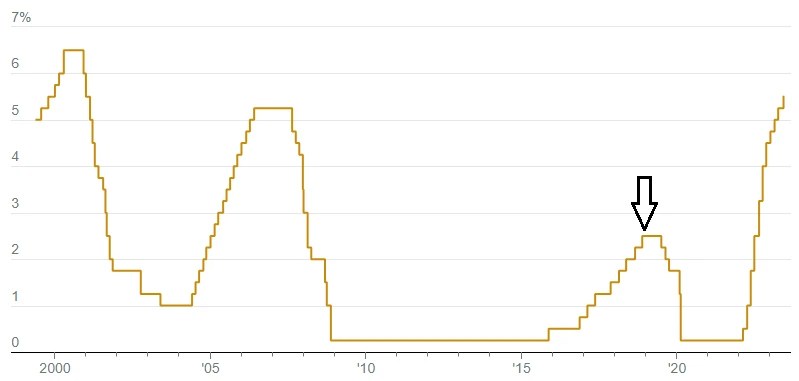
The Fed has added another quarter point to the federal funds interest rate, nudging it up towards 5.5%. This is bad news for individuals carrying variable rate debt, and those who are applying for a loan. It’s good news for me, because my retirement money is in local banks that are offering attractive CD interest rates.
This is the upside of inflation for risk-adverse retirees who are feeling the pinch of rising food prices. Finally, the financial sector isn’t skewed 100% in Wall Street’s favor and, whatta ya know, Wall Street is still doing fine.
For almost fifteen years, the easy money policy of the Fed gave Wall Street at least two advantages. First, money could be borrowed for free, tempting brokers to make risky speculative investments of the sort that contributed to the crisis of 2008. Second, there was a massive transfer of money into equities from commercial banks, because regular bank accounts paid nothing. Savings accounts are actually “losing accounts.”
The arrow in the graphic shows the last time I locked in an interest rate for my IRA CD’s. The pre-Covid rate of 2.5 percent wasn’t much, but it was a big bump up from what the rates had been, following the crisis of 2008. If the interest rate had stayed at zero, I would have given up the safety of bank CD’s for index funds. For now I can safely remain a contrarian, and a true financial conservative.
Ah ha! So this is a triple play. Until Denro pointed it out, the only Triple Play I knew about was my FiOS Internet/TV/Phone plan with Verizon. He says it was only the 2nd 8-3-5 Triple Play in Major League history. Whatever that means.
https://youtu.be/d_-jKfU-mbQ
Now I need someone to explain to me what the line of scrimmage is in football. You can infer my level of interest from the fact that I don’t know. 😉
I enjoyed playing baseball as a kid. My problem was being left-handed, but taught to bat right-handed, so I was terrible at hitting a ball. When I became near-sighted in the fifth grade, I had the fear of Mom put in me about breaking my glasses, so I only wore them indoors. Which meant I couldn’t see the ball. A red playground ball I could see, and dodge ball was my game during recess in the 5th and 6th grades.
It turned out to be a completely useless gimmick, and a total waste of $20. I went out and spent another twenty bucks on a proper plumbing tool, a basin wrench.
I’m planning to see Oppenheimer this week. Saturday night’s 3-hour Christopher Nolan movie was Interstellar.
The MoCA Wi-Fi extender worked very well for movie night on the patio, and equally well for using a tablet on the deck Sunday morning. On the screen is a 1952 Atlas war comic story illustrated by Joe Sinnott.
Today is the 54th anniversary of Apollo 11 landing on the Moon. As monumental as that success is today and forever, the safe return to Earth of Apollo 13 stands alone as a triumph of problem-solving teamwork. One of the pivotal decisions leading to the successful recovery was made by John Aaron, a NASA flight controller in charge of the electrical and environmental systems and consumables, known as EECOM.
Neil Armstrong had been selected for Apollo 11 based on his successful handling of the uncontrolled rolling of Gemini 8. Aaron was put in charge of EECOM for the Apollo 13 emergency because he had saved the launch of Apollo 12 with his instruction to the crew, “SCE to AUX.”
I laughed watching that video, because at work I had been in situations that were similar, albeit far less significant and consequential. One of them happened while I was already planning to retire.
In the mid-90’s, with the end of the minicomputer era and the coming dominance of Microsoft Windows, management decided that our customers were responsible for their own Information Technology support, with the option of hiring an approved system integrator. Their expectation was that computer rooms were no longer needed, because servers would be the size of dehumidifiers and wheeled under workstations in offices. Which was exactly the opposite of what happened with the Internet-driven growth of massive data centers and the development of hyper-converged networking for cloud computing.
The company didn’t want to get dragged into customer problems with virtual servers, local area networks, and storage area networks, etc. So there was no money to be made by doing that, and I would be reminded that we were a software company, as if I didn’t know, and to stay out of what were considered to be “hardware problems.”
Whenever an intractable technical problem was escalated to me, the right thing to do was refer the customer to one of our approved technology integrators. It was a pointless exercise, however, because the fact the problem had been dropped in my lap meant the support team should have already done that, and probably had. The customer may have had a bad experience with an integrator, or they couldn’t afford the cost, and/or they were usually doing all right with their own IT staff. Sales reps sometimes gave customers the wrong impression of the services we provided.
Every so often a hospital executive would complain to the director above me, or to one of the VP’s above him, and I would be told, “see what you can do.” This would even happen after I had told them about the problem and been denied permission to work on it. My feeling was, “Just let me do my f*cking job!” But they insisted it wasn’t my job… except on those occasions when they said it was. Which happened many times, and yet the company’s two-headed policy was never changed. Bad management ruled the roost.
There was a hospital with a high-end storage system from EMC, called the Symmetrix, that was suffering from extremely poor disk performance. Orders were backing up, and the problem was getting worse. I recall that a VP, who wasn’t in my reporting path, called me and asked if I could please help. Sure, why not? I was going to retire.
There was no way the hospital could be straining a Symmetrix enough to make it even breathe hard. The VP clicked me into a conference call with the customer’s IT team on a speaker phone. A tactic I liked to use was to ask myself, “What would I do to create this problem?” The answer was to have all of the data written to, and read from, a single port on the storage system. Which was exactly what the customer was doing. The reason why it was set up that way was because the connection could handle 8 Gigabits/second of throughput, and they were only using 2 Gbps. As expected, the storage system should have handled that much bandwidth with ease, but it was failing.
I told a tech to go to the worst performing virtual machine and manually switch the database’s virtual drive to the connection for the failover path, leaving the other VM’s as they were. There was reluctance, even resistance, to my suggestion. I remained firm by pointing out that nothing else they tried had worked. It came down to me saying, “Just do it!” There were a couple moments of silence, then I heard laughter and somebody exclaimed, “Holy sh*t! The entire day’s queue of orders just went through! It’s working!” I proposed they keep the failover port for its intended purpose, but to activate three more ports for the virtual servers, and set VMware to round-robin each IO operation between them. If one of them failed for some reason, the failover port would kick in.
The customer asked me to stay on the line, and an independent consultant they hired, who had failed to diagnose the cause of the problem, was put on the conference call. He was told what had been done, and yet he maintained that extra paths weren’t needed, because the sustained bandwidth being consumed was less than 2 Gbps on an 8 Gbps interface. I heard him making that point, and someone on the line told him, “You don’t understand. It worked!”
Without saying so on the call, I knew his thinking was wrong. I guessed it was based on experience with more read-intensive applications, rather than real-time write-intensive online databases. The consultant didn’t understand the difference between the need for bandwidth and the demands of a busy database on a processor. The CPU that was dedicated to managing the port was pegged at 100% and the load needed to be spread out. That was my “SCE to AUX” moment. 😉